

Momentum’s Exclusion List feature gives you precise control over which data gets analyzed across your revenue communications. Whether you’re syncing call recordings from tools like Gong, Clari Copilot, or Chorus, or relying on Momentum’s native call recording, Exclusion Lists help ensure your reporting and AI workflows remain focused on the right conversations.Documentation Index
Fetch the complete documentation index at: https://docs.momentum.io/llms.txt
Use this file to discover all available pages before exploring further.
What is an Exclusion List?
An Exclusion List is a configurable set of criteria that tells Momentum to skip processing certain emails or calls. You can exclude:- Specific email addresses
- Entire email domains (e.g.
@vendor.com) - CRM accounts based on your own business logic
Types of Exclusions
Momentum supports three main types of exclusions:1. Email Exclusion List
Prevent analysis of calls and messages to related to specific email addresses. Examples:legal@yourcompany.comit@vendor.com
2. Email Domain Blocklist
Skip processing for all calls or emails associated with a given domain. Examples:@yourinvestors.com(to avoid recording board meetings)@partner.org(to avoid partner back-and-forth emails)
3. Conditional Exclusions (Advanced)
For CRM-integrated workflows, you can define structured conditions to exclude conversations based on business-specific rules. This is especially useful for handling scenarios like:- Accounts that have opted out of call recording
- Customers located in a certain region
- Internal testing accounts
Opt_Out_of_Call_Recording__c is set to true will be excluded from recording and downstream analysis.
🔐 Use conditional logic to align your conversation analysis with customer preferences, privacy needs, or internal segmentation strategies.
How Exclusion Lists Work
Exclusions are applied across the following inputs:- Calls pushed into Momentum from CI tools like Gong, Clari Copilot, and Chorus
- Calls recorded natively by Momentum (when no CI tool is in use)
- Emails or Cases flowing into Momentum through your CRM
- Ignore that conversation for any AI analysis
- Exclude it from Autopilot workflows
- Skip applying AI Signals or triggers
- Not surface the conversation in reporting or deal rooms
Managing Exclusion Lists in the UI
You can configure Exclusion Lists directly in the Momentum dashboard. Navigate to: Settings → Security → Exclusion Lists From here, you can:- Add individual emails or domains
- Paste in a list of entries
-
Define conditional logic using the advanced editor
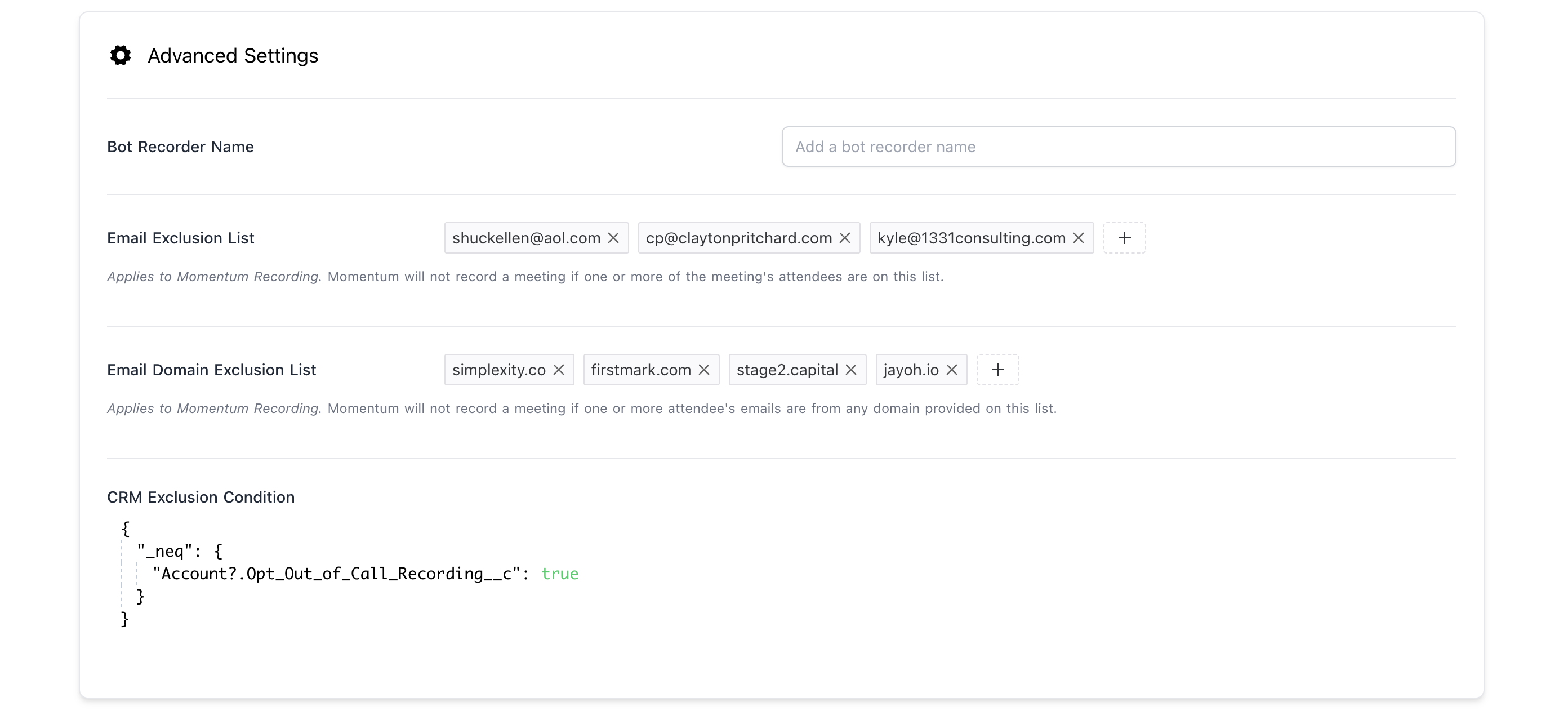
⚠️ Note: The previous names Email Blocklist and Email Domain Blocklist are now updated to Email Exclusion List and Email Domain Exclusion List for clarity.
Best Practices
- Exclude sensitive attendees to avoid the recording of meetings that should be kept private.
- Block known vendors that don’t impact pipeline to keep reporting focused.
- Use conditional logic to align analysis with your compliance requirements.